
Surya Neduru
E Commerce
View Profile ->Tutors & Institutes:
The "FindMyGuru for Tutor" App is LIVE! Download now and never miss a student enquiry.
Tutors & Institutes:
Refer a tutor and earn rewards when they join. Refer & Earn
A detailed, side-by-side comparison of Shopify and WooCommerce covering pricing, ease of use, customization, scalability, and total cost of ownership — for entrepreneurs, small business owners, and developers choosing their eCommerce platform in 2026. Last Updated: July 2026
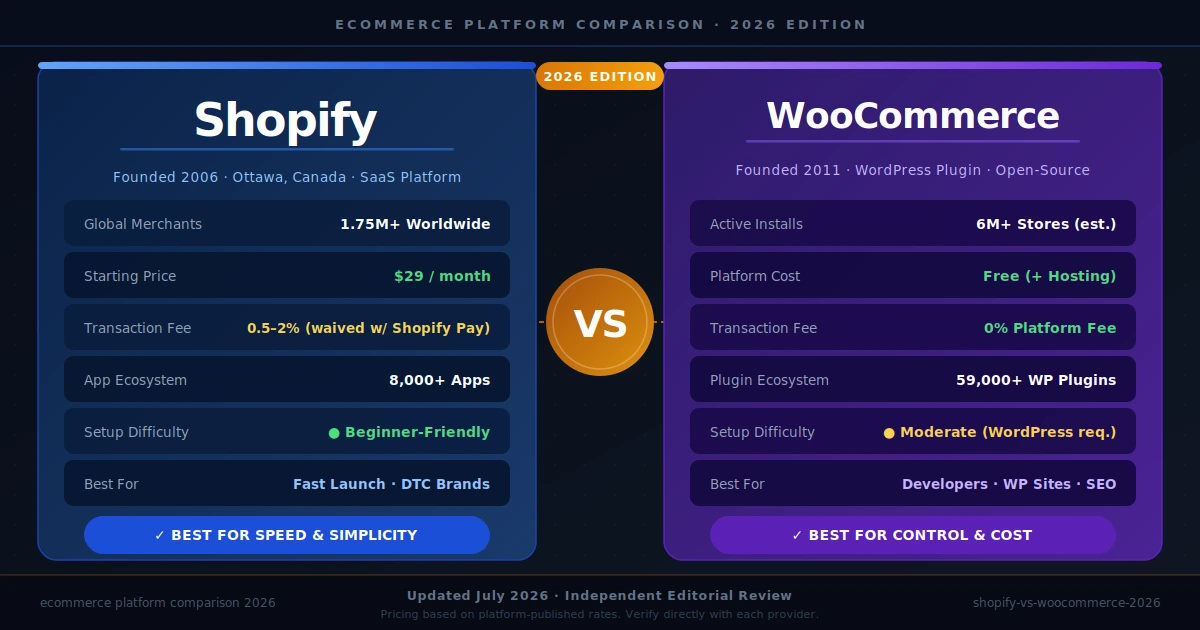
Shopify is better for entrepreneurs and small business owners who want a fast, fully managed eCommerce store without dealing with hosting or technical maintenance — plans start at $29/month (platform-published). WooCommerce is better for developers, WordPress users, and cost-conscious sellers who want complete control over their store, with no mandatory monthly platform fee (though hosting and plugin costs apply). If your goal is to launch quickly with minimal technical friction, choose Shopify; if maximum customization and long-term cost savings matter more, choose WooCommerce.
Founded in 2006 by Tobias Lütke in Ottawa, Canada, Shopify is a fully hosted, Software-as-a-Service (SaaS) eCommerce platform. As of 2026, it powers over 1.75 million merchants across 175+ countries (platform-published), making it one of the world's most widely used online store builders. Shopify operates on a subscription model with plans ranging from Basic to Shopify Plus (enterprise tier), and earns additional revenue through its own payment gateway, Shopify Payments, and its app marketplace. Its primary user base spans first-time entrepreneurs, direct-to-consumer (DTC) brands, and mid-market retailers seeking a reliable all-in-one solution.
WooCommerce is a free, open-source eCommerce plugin for WordPress, originally launched in 2011 by WooThemes and acquired by Automattic (the company behind WordPress.com) in 2015. It powers an estimated 26–28% of all online stores globally (reported by industry analysts), making it the single most-installed eCommerce solution by raw numbers. Unlike Shopify, WooCommerce is self-hosted — store owners must arrange their own web hosting, SSL certificates, and ongoing maintenance. Its business model relies on premium extensions, themes, and managed hosting partnerships. Its core user base includes WordPress developers, bloggers monetizing their content, and businesses that already operate WordPress sites.
Feature | Shopify | WooCommerce |
Founded | 2006 | 2011 (by WooThemes) |
Primary Market | Global (US, UK, Canada, India, AU) | Global — largest base in US & EU |
Hosting | Fully managed / cloud-hosted | Self-hosted (user provides server) |
Platform Type | SaaS (closed-source) | Open-source WordPress plugin |
Base Cost | From $29/month (Basic plan) | Plugin is free; hosting ~$5–$50/month |
Transaction Fees | 0.5%–2% if not using Shopify Payments | 0% (payment gateway fees apply) |
Ease of Setup | Beginner-friendly; 1–2 hours | Moderate; requires WordPress setup |
Themes / Templates | 100+ free & paid; Shopify Theme Store | Thousands via WordPress.org & third parties |
App / Plugin Ecosystem | 8,000+ apps in Shopify App Store | 59,000+ WordPress plugins available |
Customization Depth | Moderate (code access via Liquid) | Unlimited (full PHP/CSS/JS access) |
Payment Gateways | 100+ supported gateways | 100+ via plugins (Stripe, Razorpay, etc.) |
Built-in SEO Tools | Good — built-in meta, sitemap, alt | Excellent — full WordPress SEO stack |
Mobile App | Yes — Shopify mobile app (iOS/Android) | Yes — WooCommerce mobile app |
Multi-Currency Support | Built-in with Shopify Payments | Via plugins (e.g., WooCommerce Currency) |
Security & SSL | Included in all plans | User responsible; via hosting provider |
Inventory Management | Built-in, robust | Built-in; advanced via plugins |
Abandoned Cart Recovery | Built-in (Shopify plan and above) | Via plugin (free & paid options) |
Blog / Content Functionality | Basic blog included | Full WordPress CMS — very powerful |
Analytics & Reporting | Built-in dashboard; advanced on higher plans | Via WooCommerce reports + Google Analytics |
Scalability | Handles high-traffic with no config | Scales with good hosting; needs management |
Support | 24/7 live chat, email, phone (Shopify plan+) | Community forums, docs; limited official support |
Best For | Fast launch, non-technical users, DTC brands | WordPress users, developers, budget-conscious sellers |
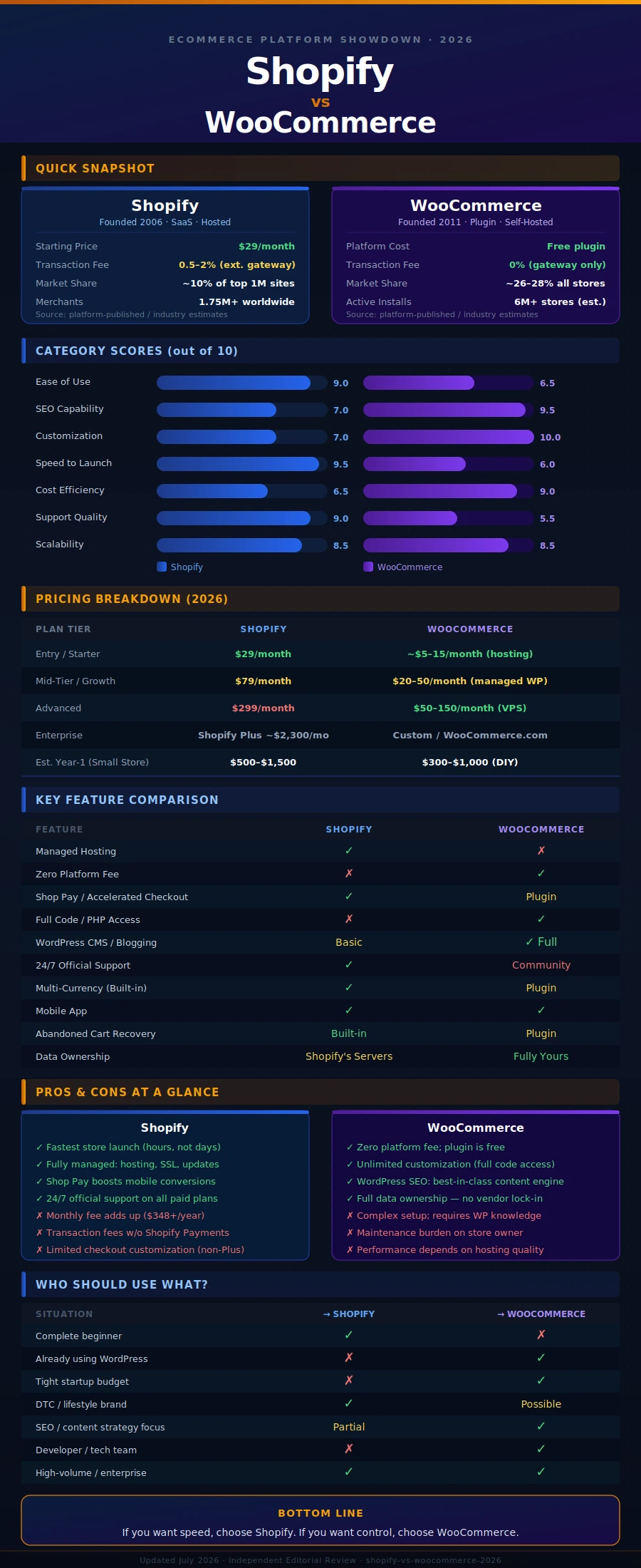
Table Summary: Shopify's key advantage is its fully managed infrastructure and all-in-one simplicity, while WooCommerce wins on raw customization depth and plugin availability. The most critical practical difference is cost structure: Shopify charges a predictable monthly subscription, whereas WooCommerce's "free" plugin requires budgeting for hosting, security, and premium extensions that can add up significantly.
One of the most searched questions about these two platforms is: "Which is cheaper — Shopify or WooCommerce?" The answer depends on your store's scale, technical skill, and plugin needs. Here is a realistic cost comparison based on platform-published pricing and merchant-reported estimates.
Cost Category | Shopify | WooCommerce |
Starter / Entry-Level | $29/month (Basic) | $5–$15/month (shared hosting) |
Mid-Tier / Growth | $79/month (Shopify plan) | $20–$50/month (managed WP hosting) |
Advanced / High-Volume | $299/month (Advanced plan) | $50–$150/month (VPS/dedicated) |
Enterprise | Shopify Plus from ~$2,300/month | Custom (WooCommerce.com or Pressable) |
Transaction Fee | 0.5%–2% (waived with Shopify Payments) | 0% (gateway fees: 1.4%–2.9% typical) |
Essential Plugins / Apps | $50–$200/month (apps) | $100–$500/year (premium plugins) |
Professional Theme | $140–$400 (one-time) | $50–$200 (one-time via ThemeForest) |
SSL Certificate | Included free | Free via Let's Encrypt (self-configured) |
Developer / Setup Cost | Low (DIY-friendly) | Medium–High ($500–$3,000+ for custom builds) |
Estimated Year-1 Total (Small Store) | $500–$1,500 | $300–$1,000 (DIY) / $1,000–$4,000 (dev) |
Can It Scale to 10,000+ Orders? | Yes — no extra config needed | Yes — with appropriate hosting investment |
Cost Verdict: WooCommerce has a lower entry cost for technically capable users, but Shopify's total cost of ownership can be comparable once you account for hosting, security management, and premium plugins. For non-developers, Shopify typically offers better value per hour of time saved. For developers or businesses already on WordPress, WooCommerce is almost always more cost-effective.
Start a free trial at shopify.com — no credit card required for 3 days (then $1/month for the first 3 months under standard promotional offers). Tip: use this trial period to test themes and add a few products before committing to a paid plan.
Choose a plan (Basic at $29/month is sufficient for most new stores). Tip: start on Basic and upgrade only when you need Shopify's professional reports or lower transaction fees.
Select and customize a theme from the Shopify Theme Store. Tip: free themes like Dawn or Craft are production-ready and load fast — avoid over-investing in a premium theme before you have validated your products.
Add your products with high-quality images, SEO-optimized titles, and detailed descriptions. Tip: use Shopify's built-in AI description generator for first drafts, then edit for brand voice.
Set up a payment gateway — activating Shopify Payments eliminates transaction fees if available in your country. Tip: always enable PayPal as a secondary option, as many shoppers trust it over entering card details directly.
Configure your shipping zones, rates, and fulfillment settings before going live. Tip: use Shopify's free "Shopify Shipping" to access discounted carrier rates in the US, UK, Canada, and Australia.
Connect your custom domain and go live. Tip: purchase your domain through a third-party registrar (Namecheap, GoDaddy) rather than Shopify to retain full ownership if you ever switch platforms.
Install only the apps you truly need — start with Shopify Email and a review app like Judge.me. Tip: every additional app can slow your store; audit your app list monthly.
Purchase a WordPress hosting plan from a WooCommerce-recommended provider (Bluehost, SiteGround, or Pressable). Tip: choose a managed WordPress host rather than generic shared hosting for better performance and automatic updates.
Install WordPress, then install the WooCommerce plugin from the WordPress plugin repository — it is free. Tip: run the WooCommerce Setup Wizard fully before installing additional plugins; it configures payments, shipping, and tax in one flow.
Choose a WooCommerce-compatible theme — Storefront (free, by WooCommerce) or a premium theme from ThemeForest. Tip: always test your theme for Core Web Vitals scores before going live; theme performance directly affects Google rankings.
Add products via WooCommerce > Products. Configure variable products (sizes, colors) using the built-in attribute and variation system. Tip: install a free bulk product import plugin (WP All Import) early if you have more than 20 products.
Install a payment plugin — WooCommerce Payments (Stripe-backed), Razorpay (India), or PayPal are all free to install. Tip: WooCommerce Payments gives an integrated dashboard for payouts and dispute management without leaving WordPress.
Configure shipping zones and install a tax plugin (Avalara or WooCommerce Tax for US stores). Tip: install WooCommerce's free "Shipping" extension early — it connects UPS, USPS, and FedEx real-time rates.
Install Yoast SEO or Rank Math for full SEO control — this is WooCommerce's biggest advantage over Shopify. Tip: configure schema markup for products immediately; it unlocks rich results in Google search.
Set up automated backups via UpdraftPlus or your host's backup tool before going live. Tip: run a complete backup before any plugin update — WooCommerce plugin conflicts are the most common cause of store downtime.
• Checkout: Shopify's one-page checkout (rolled out 2023) is among the fastest in the industry — reported to reduce cart abandonment by up to 15% (Shopify-published case studies).
• Shop Pay: Shopify's accelerated checkout lets returning shoppers complete purchases in 2 taps, with saved payment and shipping details. Particularly powerful for mobile commerce.
• Trust signals: Every Shopify store carries an SSL certificate and a Shopify-hosted which many shoppers recognize as a security signal.
• Mobile experience: Shopify themes are mobile-first by default. Performance scores on mobile are generally excellent out of the box.
• Limitation: Shopify's checkout customization (fonts, layout, branding beyond logo and color) is limited to Shopify Plus merchants — a common frustration for mid-tier stores.
• Checkout: WooCommerce's default checkout is multi-step and older in design. However, plugins like CartFlows or WooFunnels can transform it into a high-converting one-page flow.
• Flexibility: Product page design, cart behavior, and checkout field customization are nearly unlimited — ideal for stores with complex product configurations.
• Trust signals: Trust is entirely store-owner managed. Without an SSL certificate, security badges, and verified reviews, WooCommerce stores can feel less polished to cautious shoppers.
• Performance: Heavily dependent on hosting quality and plugin count. A well-optimized WooCommerce store can outperform Shopify; a poorly configured one can be significantly slower.
• Strength: WooCommerce's deep WordPress CMS integration allows content-rich shopping experiences — buying guides, blog posts, and product tutorials all in one ecosystem, which improves SEO and shopper confidence.
Overall, Shopify delivers a more consistent and polished out-of-the-box shopper experience, particularly on mobile and at checkout. WooCommerce's shopper experience has a higher ceiling but requires deliberate configuration and quality hosting to match Shopify's defaults.
FindMyGuru
The right platform depends on your technical skill, budget, growth goals, and existing tech stack. Use this table to find your match.
Your Situation | Choose Shopify | Choose WooCommerce |
Complete beginner, first store | ✓ Fastest path to launch; no tech skills needed | — Setup complexity may overwhelm beginners |
Already using WordPress | — Extra platform, extra cost | ✓ Seamless integration; add store to existing site |
Tight startup budget | — $29/month minimum | ✓ Can start for under $10/month on shared hosting |
Developer / technical team | — Limited backend access | ✓ Full codebase control; custom functionality |
DTC / fashion / lifestyle brand | ✓ Beautiful themes; Shop Pay accelerates sales | — Requires more theme effort for same polish |
High-volume / enterprise | ✓ Shopify Plus handles millions of orders | ✓ With right hosting; lower per-transaction cost |
SEO-focused content strategy | — Blog is basic; limited CMS power | ✓ WordPress is the gold standard for content SEO |
International / multi-currency | ✓ Built-in multi-currency with Shopify Payments | — Requires currency conversion plugins |
Subscription / membership site | — Requires Recharge app (~$99/month) | ✓ WooCommerce Subscriptions ($199/year) |
Dropshipping business | ✓ DSers/Zendrop integration is seamless | ✓ AliDropship plugin works well too |
PROS:
• Fastest setup in eCommerce — a functional store can go live in under 24 hours with no technical knowledge.
• Fully managed infrastructure: hosting, security, SSL, backups, and platform updates are all handled automatically.
• Shop Pay and accelerated checkout drive industry-leading conversion rates, especially on mobile.
• 24/7 customer support (live chat and phone) available from the Shopify plan upward — critical for business owners without technical support.
• Shopify Payments eliminates transaction fees and consolidates payment management in one dashboard.
CONS:
• Monthly subscription costs accumulate — even the Basic plan ($29/month) becomes $348/year before apps, themes, or domains.
• App dependency: many essential features (subscription billing, advanced upsells, loyalty programs) require paid third-party apps, adding $50–$300/month in costs.
• Limited content / blog capabilities — WooCommerce's WordPress CMS is significantly more powerful for content-driven SEO strategies.
• Checkout customization locked behind Shopify Plus — brands that want full checkout control must upgrade to the enterprise tier.
PROS:
• No mandatory platform fee — the plugin is free, making it the most cost-effective path for technically capable teams.
• Unlimited customization: full PHP/CSS/JavaScript access means virtually any feature can be built or extended.
• World-class SEO via WordPress — Yoast, Rank Math, and the full WordPress ecosystem give WooCommerce stores a structural SEO advantage.
• 59,000+ WordPress plugins cover almost every business requirement, often at a fraction of Shopify app prices.
• Full data ownership — your store data lives on your own server, with no vendor lock-in.
CONS:
• Setup complexity — beginners must configure hosting, WordPress, WooCommerce, payment plugins, and security separately before selling their first product.
• Maintenance burden — plugin updates, security patching, and backups are the store owner's responsibility, adding ongoing time cost.
• Performance is hosting-dependent — a budget shared host will produce a slow store that hurts both conversion rates and SEO rankings.
• No official 24/7 support — WooCommerce relies on community forums and documentation; urgent production issues require a developer or paid hosting support.
Shopify is the clear winner for entrepreneurs who want to move fast, avoid technical management, and focus entirely on sales and marketing. Its managed infrastructure, excellent mobile checkout, and 24/7 support make it the most reliable option for non-technical founders and DTC brands. WooCommerce is the clear winner for WordPress users, developers, and businesses running content-heavy sites where SEO is a core growth channel. Its zero platform fee, unlimited customization, and deep plugin ecosystem give technically capable teams a cost and flexibility advantage that Shopify cannot match.
For students: Shopify provides a more structured, safer shopping environment. For budget-conscious developers or agencies managing multiple client stores: WooCommerce's open-source model and data ownership cannot be beaten. If you manage more than three client stores, a WooCommerce multisite setup dramatically reduces per-site overhead compared to separate Shopify plans.
A hybrid strategy also exists: use WordPress with WooCommerce for your content and SEO engine, and consider Shopify's Buy Button (embedded widget) for specific high-converting product pages — though this adds integration complexity.
Evaluating Shopify vs WooCommerce 2026 is the ultimate dilemma for digital entrepreneurs selecting an enterprise infrastructure. Modern merchants must weigh Shopify’s fully managed, cloud-hosted ecosystem against WooCommerce’s open-source WordPress flexibility, ensuring their chosen software architecture aligns perfectly with global scaling requirements, conversion optimization goals, and long-term search engine visibility.
Conducting a comprehensive Shopify vs WooCommerce 2026 review highlights a distinct operational divide between absolute convenience and open-source control. Shopify delivers a robust, zero-maintenance sandbox featuring natively integrated artificial intelligence tools, while WooCommerce provides unparalleled design autonomy and granular database ownership for technically inclined store owners.
Analyzing the Shopify vs WooCommerce 2026 salary scales reveals a lucrative landscape for skilled developers across both e-commerce disciplines. Enterprise Shopify engineers specialized in Liquid, Hydrogen, and headless architectures command premium contract rates, while specialized WooCommerce full-stack developers extract significant hourly fees for complex custom database configurations.
Calculating the total Shopify vs WooCommerce 2026 cost requires looking past the baseline subscription price tags. Shopify operates on transparent monthly tiers ranging from $39 to $399 plus transaction surcharges, whereas WooCommerce remains entirely free to download but demands variable investments in premium hosting, security, and paid plugin extensions.
Choosing the ultimate platform architecture to launch your digital store can feel overwhelming, but FindMyGuru simplifies your decision-making journey. As India’s leading educational discovery and research engine, the portal allows aspiring digital entrepreneurs to seamlessly analyze the core technical parameters defining Shopify vs WooCommerce 2026. By organizing comprehensive side-by-side breakdowns of development skill sets, real-world platform deployment fees, and professional training certifications, the portal removes the guesswork. Whether you are exploring topics like iOS vs Android, an aspiring web engineer looking to master scalable Liquid code, or a founder seeking a hands-on development boot camp, FindMyGuru guides you directly to the ideal training path.
What to sell on Shopify in 2026?
The most lucrative products to sell on Shopify involve high-margin, hyper-niche physical goods, eco-friendly consumer products, personalized print-on-demand merchandise, and curated specialty items driven by strong viral content marketing strategies.
Will AI replace Shopify developers?
No, artificial intelligence will not replace expert Shopify developers, though it will automate entry-level theme tweaks, basic boilerplate generation, and simple code testing routines, pushing human engineers toward advanced app architecture and headless store management.
Why do 90% of people doing Shopify with FB ads fail?
The vast majority of stores fail due to a fatal combination of poor unit economics, unoptimized product landing pages, generic saturated items, and uninspired creative testing frameworks that cannot survive modern ad auction bidding costs.
Which online business is most profitable in 2026?
High-ticket dropshipping, proprietary digital product ecosystems, software-as-a-service (SaaS) utilities, and specialized community-driven subscription boxes yield the highest net profit margins across the modern digital landscape.
Shopify vs Woocommerce for dropshipping?
Shopify is overwhelmingly superior for high-volume dropshopping due to its plug-and-play architecture, instant checkout stability, and robust automated supply-chain app integrations that seamlessly process thousands of daily consumer orders.
What are people actually using as the best ecommerce platforms in 2026?
Serious enterprise brands are relying heavily on Shopify Plus for unified cloud scaling, while content-heavy brands, digital product creators, and independent developers stick firmly to WooCommerce for unconstrained open-source platform customization.
Did you choose Woocommerce over Shopify? Curious what helped you decide.
Merchants systematically choose WooCommerce over Shopify when they demand absolute ownership of their transactional data, refuse to pay recurring platform transaction fees, or require deeply complex, non-standard product customization rules.
Is Shopify a viable niche for side income in 2026?
Yes, Shopify remains a highly viable channel for side income provided entrepreneurs bypass generic low-quality products and instead build targeted storefronts backed by authentic organic short-form video engagement.
Amazon or Shopify in 2026?
Amazon is ideal for instantly capturing massive existing consumer search traffic, whereas Shopify is essential for scaling an authentic, independent direct-to-consumer brand that retains complete control over long-term customer relationships.

Join thousands of tutors who are sharing their knowledge and helping students succeed.
Start getting StudentsExplore Tutors by Location and Skills
Find Expert tutors across India for Popular Subjects, Skills and Cities
Popular courses
Popular Locations
Popular Searches