

Vaibhav Krishnatrya
Mobile App Development
View Profile ->Tutors & Institutes:
The "FindMyGuru for Tutor" App is LIVE! Download now and never miss a student enquiry.
Tutors & Institutes:
Refer a tutor and earn rewards when they join. Refer & Earn
This page compares iOS and Android across every major dimension — security, customisation, ecosystem, price, and AI features — for smartphone buyers, developers, and switchers in 2026. Android holds ~72% global market share while iOS leads in the US and premium segments; the right choice depends entirely on your priorities. Both iOS 18 and Android 15/16 have arrived with meaningful updates, and this comparison uses the latest platform-published data and reported user feedback to help you decide. Last Updated: July 2026
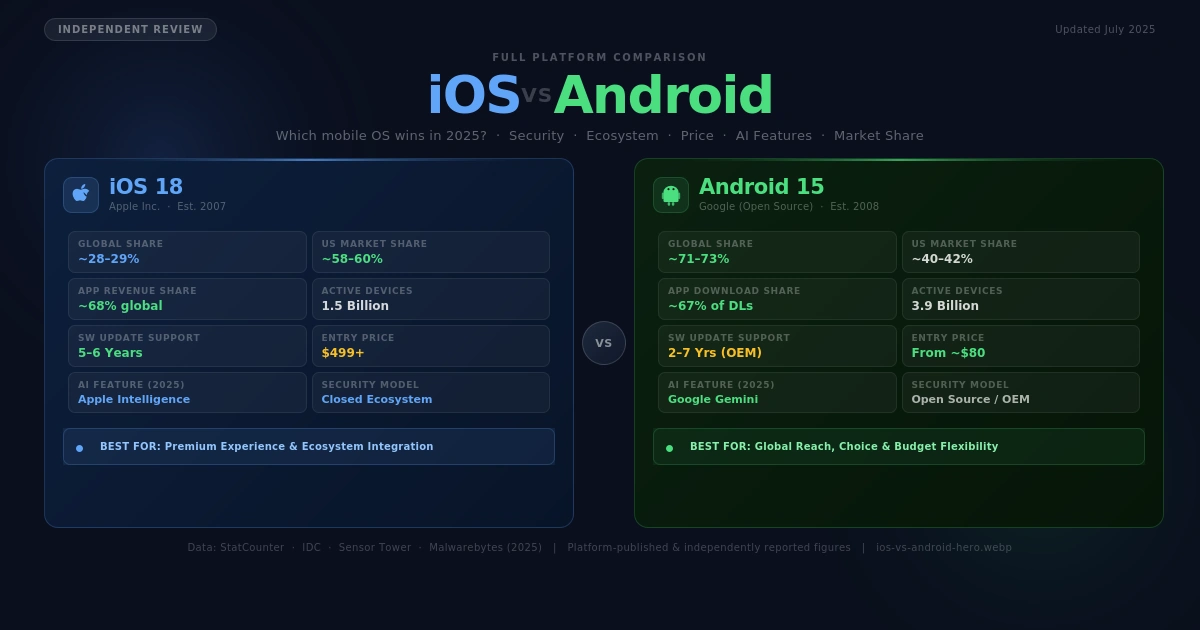
Android is better for users who prioritise choice, customisation, and budget flexibility — it runs on thousands of devices from under $100 to over $1,500, and commands roughly 72% of the global smartphone market in 2026 (source: StatCounter, platform-published). iOS is better for users who want a tightly integrated, consistently secure, and long-supported ecosystem — iPhones receive updates for up to six years and iOS generates over 68% of global app revenue despite representing only ~28% of devices (source: Sensor Tower, platform-published). If your goal is value for money on a global scale, choose Android; if your goal is a premium, locked-down experience with maximum software longevity, choose iOS.
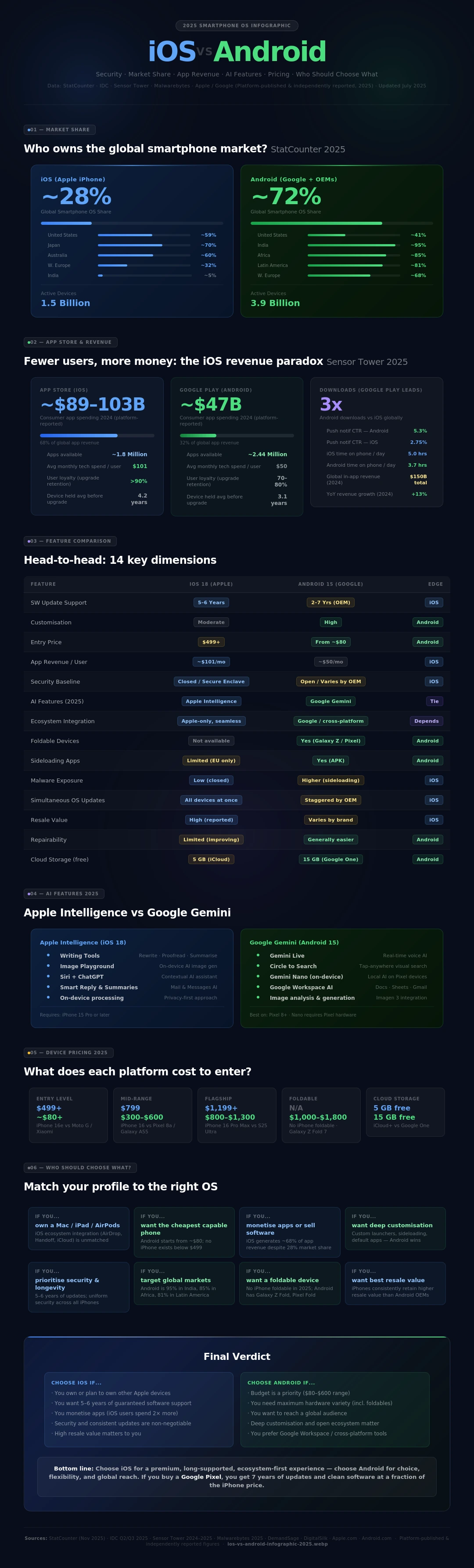
iOS is Apple's proprietary mobile operating system, first released in 2007 alongside the original iPhone. It runs exclusively on Apple hardware — the iPhone — making it a deliberately closed, vertically integrated platform. As of mid-2026, iOS 18 is the current release, with iOS 26 announced for later in 2026. Apple supports iPhones for approximately five to six years with software updates, a notably longer cycle than most Android manufacturers. iOS holds approximately 28–29% global market share (StatCounter, platform-published, 2026) but leads in key developed markets: around 58–60% in the United States, ~70% in Japan, and over 59% in both Canada and Australia. The App Store houses approximately 1.8 million apps and generated an estimated $89–103 billion in developer revenue in 2024, far outstripping Google Play on a per-user basis. iPhones start at $499 (iPhone 16e) and reach $1,599+ for the Pro Max models.
Android is Google's open-source mobile operating system, first released publicly in 2008. It is available across thousands of device models from manufacturers including Samsung, Google, Xiaomi, OnePlus, Motorola, Oppo, and many others, spanning a price range from roughly $80 to $1,800+. Android 15 is widely deployed in 2026, with Android 16 released in June 2026 (reported adoption of ~4.66% by end-2026 per platform data). Android commands approximately 71–73% of the global smartphone OS market (StatCounter / IDC, platform-published), with dominant shares in India (95%), Africa (85%), Latin America (81%), and Western Europe (68%). The Google Play Store hosts over 2.44 million apps. Android's diversity is its defining characteristic: users can choose budget devices, customise deeply, or pick flagship hardware that rivals iPhone on every spec sheet.
Feature | iOS (Apple) | Android (Google) |
First Released | 2007 (iPhone OS 1.0) | 2008 (Android 1.0) |
Current Version (2026) | iOS 18 / iOS 26 (beta) | Android 15 / Android 16 (June 2025) |
Primary Market | Global; dominant in US, Japan, Canada, Australia | Global; dominant in Asia, Africa, Latin America, Europe |
Hardware Manufacturers | Apple only (iPhone) | Samsung, Google, Xiaomi, Motorola, OnePlus, and 1,000+ others |
Price Range | $499–$1,599+ (platform-published) | $80–$1,800+ (varies by OEM) |
Global Market Share (2026) | ~28–29% (StatCounter, platform-published) | ~71–73% (StatCounter, platform-published) |
US Market Share (2026) | ~58–60% (reported) | ~40–42% (reported) |
App Store Size | ~1.8 million apps (App Store) | ~2.44 million apps (Google Play) |
App Revenue Share | ~68% of global app revenue (Sensor Tower, reported) | ~32% of global app revenue (Sensor Tower, reported) |
Software Update Support | 5–6 years per device (platform-published) | 2–4 years (varies by manufacturer; Google Pixel up to 7 yrs) |
Customisation Level | Moderate — home screen, widgets, Control Centre | High — launchers, widgets, sideloading, custom ROMs |
Sideloading Apps | Limited (EU Digital Markets Act compliance added in 2024) | Yes — native support (APK installs) |
Ecosystem Integration | Seamless with Mac, iPad, Apple Watch, AirPods, iCloud | Integrates with Google services; varies by OEM |
AI Features (2026) | Apple Intelligence (Siri upgrade, Writing Tools, Image Playground) | Google Gemini integration; on-device AI varies by OEM |
Security Architecture | Closed ecosystem; Apple Secure Enclave; strict App Store review | Open-source; Google Play Protect; varies by manufacturer |
Malware Risk | Lower — closed ecosystem reduces attack surface | Higher exposure, especially via sideloading (Malwarebytes, reported 2026) |
Update Rollout | Simultaneous to all supported devices | Staggered by manufacturer and carrier |
Privacy Controls | App Privacy Report; ATT framework; on-device Siri processing | Privacy Dashboard; granular permissions; varies by OEM |
Repair & Repairability | Improving (Apple Self Repair Programme) | Generally easier; more third-party parts availability |
Best For | Premium experience, ecosystem users, privacy-focused | Budget users, power users, customisation seekers, global reach |
Table Summary:The most critical differences are ecosystem lock-in, price range, and update consistency. iOS wins on software longevity and revenue-per-user metrics; Android wins on hardware variety, global reach, and deep customisation. For pure value at a global level, Android's breadth is unmatched — but for a unified experience across multiple Apple devices, iOS has no equal.
The cost of choosing iOS vs Android extends beyond the purchase price of the phone itself. iOS locks you into Apple's hardware and services; Android offers far more flexibility. The table below reflects platform-published prices and user-reported estimates for 2026.
Category | iOS (iPhone) — 2026 | Android — 2026 |
Entry-Level Device | iPhone 16e from $499 (Apple.com, platform-published) | From ~$80–$150 (Motorola, Xiaomi — reported) |
Mid-Range Device | iPhone 16 from $799 (platform-published) | $300–$600 (Google Pixel 8a, Samsung A55 — reported) |
Flagship Device | iPhone 16 Pro Max from $1,199 (platform-published) | $800–$1,300 (Samsung Galaxy S25 Ultra, Pixel 9 Pro — reported) |
Foldable Option | Not available | $1,000–$1,800 (Galaxy Z Fold 7, Pixel 9 Pro Fold — reported) |
Smartwatch Integration | Apple Watch required ($249–$799, platform-published) | Wear OS / Samsung Galaxy Watch ($200–$600, reported) |
Cloud Storage (entry) | 5 GB free; iCloud+ from $0.99/month (platform-published) | 15 GB free (Google One); plans from $1.99/month (platform-published) |
App Revenue Contribution | ~$101/month avg tech spend per user (reported, DemandSage) | ~$50/month avg tech spend per user (reported, DemandSage) |
Resale Value | iPhones retain higher resale value (reported by industry analysts) | Varies widely by brand; Pixel and Samsung retain better than budget OEMs |
Cost Verdict:Android wins on entry cost by a wide margin — you can get a capable Android smartphone for under $150, while the cheapest new iPhone is $499. However, iOS devices typically command higher resale values and iPhones are often supported with software updates long after budget Androids have been abandoned. For total cost of ownership over four or five years, the gap narrows considerably.
1. Back up your Android data. Use Google's built-in backup (Settings > Google > Backup) to save contacts, photos, and app data to Google Drive before you start. Insider tip: also back up WhatsApp chat history separately — it does not transfer automatically.
2. Download the Move to iOS app on your Android device. This is Apple's official migration tool (available on Google Play), and it transfers contacts, message history, photos, videos, and some app data directly via Wi-Fi. Insider tip: run the transfer on Wi-Fi only and keep both phones on charge — large libraries can take over an hour.
3. Set up your iPhone and select 'Move Data from Android' during setup. Both devices will display a code; enter it on Android to begin the transfer. Insider tip: do not use your Android phone during transfer, as activity can interrupt the process.
4. Re-download your apps from the App Store. The Move to iOS tool transfers a list of your Android apps and queues downloads for any iOS equivalents. Insider tip: check if any Android apps you rely on are unavailable on iOS before you switch — some niche productivity tools are Android-only.
5. Set up Apple ID and iCloud. Sign in or create an Apple ID to sync photos, contacts, and device backups. Insider tip: enable iCloud Photo Library from day one to avoid duplicate photo management headaches.
6. Reconfigure messaging. iMessage and FaceTime will activate automatically, but you must deregister your phone number from iMessage at appleid.apple.com if you plan to receive SMS on a non-Apple device going forward. Insider tip: forgetting this step is the most common reason Android users stop receiving texts after switching.
7. Explore iOS settings for customisation. Add widgets to the home screen (long-press > Edit Home Screen), set up Control Centre shortcuts, and configure Focus Modes for work/life balance. Insider tip: iOS 18 allows full home screen grid freedom — you can now place icons anywhere, not just top-to-bottom.
8. Explore Apple ecosystem add-ons. If you own a Mac, iPad, or AirPods, you will immediately notice features like Handoff, AirDrop, and Universal Clipboard that make the cross-device experience seamless. Insider tip: Safari's iCloud Tabs and Passwords sync across all Apple devices — a genuine quality-of-life upgrade for ecosystem users.
1. Back up your iPhone. Go to Settings > [Your Name] > iCloud > iCloud Backup and run a full backup. Insider tip: also export your photos to Google Photos before switching — this ensures your library transfers regardless of iCloud.
2. Move your contacts and calendar to Google. On your iPhone, go to Settings > Contacts > Accounts and add a Google account to sync your contacts. Insider tip: check for duplicates after syncing — iOS and Google sometimes create double entries.
3. Transfer WhatsApp data. WhatsApp supports iOS-to-Android transfer natively as of 2023 via the 'Move to Android' app (Google Play). Insider tip: both phones must be on the same Wi-Fi network and the iPhone must not be locked during transfer.
4. Download the Move to Android app on your iPhone. Google's official tool (iOS App Store) guides you through transferring photos, videos, contacts, and calendar events. Insider tip: this does not transfer app data (other than WhatsApp) — re-download your apps from Google Play manually.
5. Set up your Android device and sign in to your Google account. Your contacts, Gmail, and Google Photos will sync immediately. Insider tip: if your Android has a different manufacturer account (Samsung, Xiaomi), you can layer that on top of your Google account for extra features.
6. Explore Android's customisation options. Install a third-party launcher (e.g., Nova Launcher), add widgets to your home screen, and set default apps as you prefer. Insider tip: Android lets you set any browser, email client, or keyboard as default — something iOS only partially allows.
7. Reconfigure your notifications and permissions. Android's notification system is more granular than iOS — go to Settings > Notifications > App Notifications to control exactly what each app can surface. Insider tip: turn off notifications for system apps you do not use to significantly improve battery life.
8. Deregister iMessage. Go to appleid.apple.com > Sign In > iMessage and FaceTime, and deregister your phone number. Insider tip: failure to do this means your contacts who use iPhones may not be able to reach you via SMS after you switch.
• Consistent performance: Apple controls both hardware and software, meaning iOS updates optimise for every supported device simultaneously. Users report fewer stutters and longer useful device life.
• App Store quality: Apple's review process is stricter and longer than Google Play's, resulting in fewer low-quality or malicious apps. The trade-off is a slightly smaller selection and longer wait times for new app features.
• Apple Intelligence (2026): iOS 18 introduced Apple Intelligence — AI-powered Writing Tools (rewrite, proofread, summarise text system-wide), Image Playground for AI image generation, and an upgraded Siri with ChatGPT integration. Available on iPhone 15 Pro and later models (platform-published).
• Ecosystem lock-in (positive and negative): Features like AirDrop, Handoff, Universal Clipboard, and Continuity Camera are genuinely productive for multi-Apple-device users. However, these benefits evaporate the moment you use a non-Apple device.
• Home screen flexibility: iOS 18 introduced free-form icon placement, closing a long-standing gap with Android. Widgets are still less flexible than Android's, but the gap is narrowing.
• Customisation depth: Android 15 and its OEM variants (Samsung One UI 7, Google Pixel UI) allow near-total home screen and system-level customisation — custom launchers, icon packs, always-on displays, and sideloading of apps not available on the Play Store.
• Google Gemini AI (2026): Android 15 ships with Google Gemini as the default assistant, replacing Google Assistant on many devices. Gemini offers real-time AI assistance, image analysis, and deep integration with Google Workspace. On Pixel devices, on-device Gemini Nano runs locally for speed and privacy.
• Notification and widget system: Android's notification drawer and lock-screen widgets remain more flexible than iOS's — users can act on notifications directly (reply, archive, mark done) without opening the app.
• App diversity: The Google Play Store hosts more apps overall (~2.44 million vs ~1.8 million), and Android's sideloading capability means access to apps not available via official channels. This is a double-edged sword: greater access comes with higher malware exposure risk.
• Fragmentation reality: The Android experience varies widely by manufacturer. A Samsung Galaxy S25 Ultra and a $100 Xiaomi both run 'Android', but the software experience, update frequency, and security posture are dramatically different. Users should research their specific OEM's track record on updates.
Overall, iOS offers a more uniform and predictable experience, while Android offers more personalisation and hardware choice. For users already in the Apple ecosystem, iOS's integration benefits are hard to quantify but genuinely impactful. For users who want control over their digital environment or who are not invested in any ecosystem, Android's flexibility is a compelling advantage.
The right operating system depends on who you are and what you need. Use this table to find your match.
Your Situation | Choose iOS | Choose Android |
You want the most affordable smartphone | ❌ iPhones start at $499 | ✅ Android devices from ~$80 |
You own a Mac, iPad, or Apple Watch | ✅ Seamless ecosystem integration | ❌ Limited cross-device features |
You want maximum customisation | ❌ Limited to Apple's framework | ✅ Custom launchers, ROMs, deep settings |
You prioritise consistent security updates | ✅ Up to 6 years of iOS updates | ⚠️ Varies; Google Pixel gets 7 years; budget OEMs often 2 |
You are a developer targeting high revenue | ✅ iOS generates ~68% of app revenue | ✅ Android needed for global user reach |
You live outside the US/Japan/Canada | ❌ iOS has <30% market share in most markets | ✅ Android dominates in Asia, Africa, Europe, LatAm |
You want AI-powered features (2026) | ✅ Apple Intelligence on iPhone 15 Pro+ | ✅ Google Gemini on Android 14+/15 |
You value repairability | ⚠️ Apple Self Repair available but limited | ✅ Generally easier third-party repair access |
You are privacy-conscious | ✅ Strong App Store review + ATT framework | ⚠️ Strong on Pixel; varies by OEM |
You want foldable hardware | ❌ No foldable iPhone available in 2026 | ✅ Samsung Galaxy Z Fold/Flip, Pixel Fold |
You want the longest software support | ✅ 5–6 years (platform-published) | ✅ Google Pixel 9 series: 7 years (platform-published) |
You play mobile games competitively | ✅ iOS often receives game releases first | ✅ Android has broader device range for emulation |
FindMyGuru
• Long software support: Apple supports iPhones for five to six years with major iOS updates, meaning your investment lasts longer than most Android equivalents.
• Consistent security posture: The closed ecosystem, strict App Store review, and Apple's Secure Enclave hardware chip give iOS a consistently strong baseline security across all supported devices.
• Best-in-class ecosystem: AirDrop, Handoff, iMessage, AirPlay, Universal Clipboard, and Continuity Camera work seamlessly across iPhone, iPad, Mac, Apple Watch, and AirPods — unmatched in the Android world.
• Apple Intelligence (2026): Writing Tools, Image Playground, and a ChatGPT-integrated Siri offer genuinely useful AI features on iPhone 15 Pro and above.
• High resale value: iPhones consistently retain more of their purchase price at resale than equivalent Android devices (reported by industry analysts).
• Price barrier: The cheapest new iPhone (iPhone 16e) costs $499 as of platform-published pricing — there is no sub-$300 iPhone option.
• Ecosystem lock-in: Many of iOS's best features only work between Apple devices. If you use Windows, Google services, or non-Apple wearables, iOS's advantages shrink substantially.
• Limited customisation: Despite improvements in iOS 18, Android still offers significantly deeper home screen and system-level personalisation.
• No foldable option: As of 2026, Apple has not released a foldable iPhone, leaving a growing hardware category entirely to Android.
• Unmatched hardware variety: Android runs on thousands of devices from under $100 to over $1,500, including foldables, rugged phones, gaming handsets, and compact models.
• Deep customisation: Users can change launchers, icon packs, default apps, keyboards, and system-level behaviour in ways iOS simply does not permit.
• Global reach: Android's ~72% global market share means it is the default smartphone OS for most of the world, and apps and services in many markets are Android-first.
• Google Gemini AI (2026): Gemini is deeply integrated into Android 15, offering real-time AI assistance, image analysis, and on-device processing on Pixel devices.
• Sideloading flexibility: Android allows installation of apps outside the Play Store (APK sideloading), giving access to apps unavailable through official channels.
• Fragmentation: The Android experience varies enormously between manufacturers. Security update schedules, UI quality, and bloatware vary from excellent (Google Pixel) to poor (budget OEMs).
• Shorter update cycles (most OEMs): While Google Pixel devices now offer seven years of updates, many Android manufacturers support devices for only two to three years.
• Higher malware exposure: Android's open-source nature and sideloading capability make it a significantly larger target for malware. Malwarebytes reported a 151% growth in Android malware threats in a two-month period in 2026 (reported).
• Inconsistent AI quality: Google Gemini is excellent on Pixel devices but the experience degrades on budget Android hardware where on-device AI models cannot run.
In 2026, neither iOS nor Android is categorically 'better' — they serve different priorities with genuine excellence. iOS is the stronger choice for users who want a long-lived, consistently secure, and tightly integrated premium device, particularly if they already own other Apple products. The Apple Intelligence features on iPhone 15 Pro and above are among the most polished AI integrations on any mobile platform this year. Android is the stronger choice for users who want hardware flexibility, deep customisation, global platform compatibility, or a capable smartphone at a lower price point. Google's Pixel line now offers seven years of software updates — matching or exceeding Apple — while Samsung and others cover the foldable and premium segments comprehensively.
For tutors, developers, or business users specifically: iOS generates more app revenue per user and is the platform to prioritise for monetised apps or premium services. Android is essential for reaching a global audience, particularly in South and Southeast Asia, Africa, and Latin America.
For students and general consumers on a budget: Android wins clearly on affordability and value. For privacy-conscious users: iOS remains the lower-friction secure option, though a Google Pixel running stock Android is a strong privacy-forward alternative.
Bottom line: Choose iOS for a premium, long-supported, ecosystem-first experience; choose Android for choice, flexibility, and global reach — and if you buy a Google Pixel, you get the best of both worlds without the Apple price premium.
People also search for iOS vs Android
Choosing between iOS and Android comes down to balancing ecosystem integration with ultimate user freedom. While Apple provides a highly polished, locked-down environment, Android delivers unmatched hardware variety and deep system customization. Understanding these fundamental platform differences helps you choose the perfect smartphone experience tailored precisely to your daily workflow.
The biggest difference lies in system ecosystem control and software philosophy. Apple utilizes a closed walled garden model, tightly merging proprietary hardware with iOS software for uniform optimization. Conversely, Google distributes Android as an open-source platform, empowering numerous global manufacturers to customize the interface, hardware configurations, and sideloading capabilities.
Neither platform is universally superior, as the ideal choice depends on your specific technological priorities. iOS is better for users seeking seamless multi-device integration, superior third-party app optimization, and intuitive simplicity. Android wins for tech enthusiasts who demand open file management, advanced split-screen multitasking, and freedom from ecosystem restrictions.
On tech subreddits, the community consensus views iOS as a low-friction platform that maintains consistent performance over years of use. Meanwhile, Reddit communities champion Android for power-user utilities, retro-gaming emulation, and the freedom to completely overhaul the system launcher and UI aesthetics without restrictive corporate oversight.
This comparison pits Apple's unified ecosystem against Google's core software and Samsung's highly customized One UI skin. While iOS offers unmatched cross-device continuity with Macs and iPads, Samsung bridges the gap by pushing cutting-edge hardware innovations, such as advanced generative foldables and desktop-grade multi-window processing features.
Android’s main advantages are diverse hardware pricing and boundless home screen customization, but its primary disadvantage remains systemic update fragmentation across budget brands. Apple's iOS offers the advantage of instant, universal security updates and long-term resale value, counterbalanced by restrictive file management and high hardware costs.
First, Android allows sideloading apps from external webs, whereas iOS strictly mandates the official App Store. Second, Android supports granular hardware expansion, while iOS configurations remain fixed. Third, iOS provides uniform, swift system updates globally. Fourth, Android delivers superior system-level multitasking. Finally, Apple prioritizes a unified, proprietary cross-device ecosystem.
Apple’s iOS remains inherently safer for average consumers due to mandatory sandboxing and aggressive App Store vetting procedures. Flagship Android phones match this safety with specialized hardware chips like Samsung Knox or Google Titan M; however, Android's option for software sideloading opens up higher baseline vulnerabilities to targeted malware.
The iOS Liquid Glass UI focuses on fluid animations, standardized app grids, and curated aesthetic minimalism that feels identical across all hardware models. The Android UI ecosystem relies on adaptive Material You design principles, enabling users to transform layouts with custom interactive widgets, custom icon packs, and system-wide themes.
Navigating the complex digital landscape between Apple's curated environment and the expansive universe of Android devices requires trusted, expert guidance. Whether you are an aspiring mobile app developer looking to master Swift and Kotlin, or a consumer tech enthusiast analyzing platform architecture, Findmyguru connects you with premier educational resources. The platform effortlessly assists learners to compare, discover, and choose the best paths or courses for this specific subject, matching you with specialized tech mentors worldwide. Let FindMyGuru streamline your educational journey so you can explore Shopify vs WooCommerce, master mobile operating systems, and elevate your technological expertise today.
The main disadvantage of iOS is its highly restrictive ecosystem, which completely blocks advanced file management and third-party app sideloading. Users are confined to Apple's pre-approved software, rigid home screen layouts, and premium-priced proprietary accessories.
By global operating system market share, Android is the undisputed number one mobile platform, powering over 71% of devices worldwide. In terms of premium individual hardware sales volume, Samsung and Apple consistently alternate for the top global smartphone manufacturer ranking.
Gen Z prefers the iPhone primarily due to powerful peer network effects driven by iMessage blue bubbles and ecosystem exclusivity. Additionally, Apple's superior optimization within popular social media frameworks like TikTok and Instagram heavily influences younger creators toward iOS devices.
Samsung is better for users demanding cutting-edge screen innovations, flexible folding form factors, and robust multi-tasking software features. iPhone is better for individuals who prioritize maximum processing speeds, streamlined video recording capabilities, and flawless integration with Apple hardware ecosystems.
You should only switch if you intend to adopt other Apple products or value highly optimized, hands-off software reliability. If you heavily rely on custom launchers, open file directories, or universal torrenting tools, the restrictive nature of iOS will likely frustrate your workflow.
Long-term switchers report that ecosystem synergy, biometric unlock speeds, and automated notification handling systems are the factors that matter most over time. iOS switchers miss Android's intuitive universal back-swipe gesture, while Android switchers frequently miss Apple's frictionless data transfer and AirDrop.
The gap has shrunk significantly, making the decision mostly a preference of ecosystem workflow rather than raw performance limits. However, distinct underlying differences remain regarding app-store monopolization, generative AI cloud handling privacy, and the level of system root customization permitted to the end user.
Android owners intentionally bypass iPhones to escape Apple's strict control over application curation and premium hardware ecosystem locking mechanisms. They prefer purchasing specialized hardware features, including secondary telephoto zoom lenses, under-display biometric cameras, or interactive folding displays at multiple consumer price brackets.
Choosing iOS is best if your workflow demands streamlined, consistent operations backed by robust security updates and high-value resale potential. Choose Android if you view your phone as an open personal computer that should feature total storage control and customizable interface frameworks.
While tech enthusiasts praise Android's superior software specifications, mass consumers choose iPhones due to massive marketing campaigns and long-term device durability. Apple's centralized retail support system and high cultural status drive massive consumer retention despite Android's theoretical feature advantages.

Join thousands of tutors who are sharing their knowledge and helping students succeed.
Start getting StudentsExplore Tutors by Location and Skills
Find Expert tutors across India for Popular Subjects, Skills and Cities
Popular courses
Popular Locations
Popular Searches