
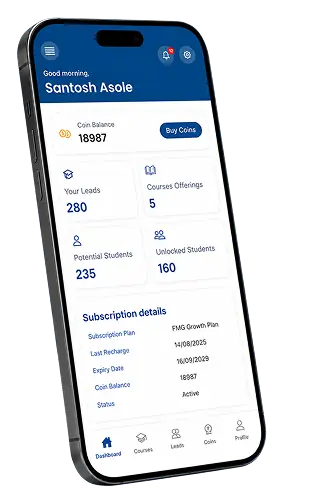


List Your Courses on FindMyGuru
FindMyGuru is a platform where tutors, teachers, and institutes can list their courses for free and connect with students looking to learn. If you are new here, you simply sign up, build your profile, add your courses, and log in anytime through the Tutor Login page to manage your leads and grow your teaching business.
Teaching is a rewarding job, but finding the right students can be hard, especially if you are just starting out or want to grow beyond your local area. FindMyGuru solves this problem by giving every tutor, coach, and institute a simple, free way to be seen by thousands of students across India who are actively searching for teachers like you.
This guide explains everything in plain, easy words — from what FindMyGuru is, to how you can list your courses, and how to log in once your profile is ready.
What Is FindMyGuru?
FindMyGuru is an online platform that connects students with tutors, teachers, coaches, and training institutes. Think of it as a meeting point: students come here to search for someone who can teach them a subject or skill, and tutors come here to show what they teach and where.
Whether you teach Mathematics, Python programming, Yoga, Guitar, Dance, Spoken English, or any other subject or skill, you can create a profile, list your courses, and let students find you directly — online or offline, in any city.
Who Can Use FindMyGuru?
Individual tutors who teach one-on-one or in small groups
Coaching institutes offering structured courses
Freelance trainers in skills like music, dance, art, or fitness
Online educators who teach through video calls
If you have knowledge to share and want more students, this platform is built for you.
Why Should You List Your Courses on FindMyGuru?
Listing your courses is not just about being "visible" online. It is about turning that visibility into real students and real income. Here is what you get:
1. Get Genuine Leads and Enquiries
Once your profile is live, students who are actually looking for what you teach can find you and send enquiries directly. You don't have to chase students — they come to you.
2. Convert Enquiries Into Students
A lead is only useful if it becomes a paying student. FindMyGuru's platform is designed to help you turn enquiries into confirmed classes, with tools to respond, chat, and share your course details easily.
3. Reach Students Beyond Your City
You are no longer limited to your neighbourhood. FindMyGuru gives you visibility across multiple cities and even lets you teach students online, so your reach isn't limited by geography.
4. Teach Online or Offline — Your Choice
Some tutors prefer face-to-face classes, others prefer teaching online, and many do both. FindMyGuru supports every teaching style, so you decide how and where you teach.
5. Keep 100% of What You Earn
Unlike some platforms that take a cut of every class fee, FindMyGuru lets you keep 100% of your earnings. You set your own price, and that price stays with you.
How to List Your Courses on FindMyGuru (Step-by-Step)
Even if you have never listed a course online before, this process is simple. Here's how it works, explained in easy steps.
Step 1: Sign Up as a Tutor
Go to the Sign Up page and create your free tutor account. You will need basic details like your name, email address or phone number, and the subject or skill you teach.
Step 2: Build Your Tutor Profile
After signing up, fill in your profile. This includes:
Your teaching experience and qualifications
A short introduction about yourself
The subjects or skills you teach
The cities or areas where you offer classes (or "Online" if you teach virtually)
A complete profile builds trust with students, so it's worth spending a few extra minutes here.
Step 3: Add and List Your Courses
Once your profile is ready, add the courses you want to offer. For each course, you can mention:
Course name and description
Class type (one-on-one, group, or online)
Duration and schedule
Fees (which stay 100% yours)
Step 4: Publish and Go Live
After you save your course details, your listing goes live on FindMyGuru. Students searching for your subject or skill in your city (or online) will now be able to see your profile.
Step 5: Start Receiving Enquiries
Once live, you will start getting leads and enquiries from interested students. You can respond to them directly through your dashboard and convert them into actual classes.
How Tutor Login Works on FindMyGuru
If you already have a FindMyGuru account, you don't need to sign up again. You simply log in.
Where to Find the Tutor Login
Look for the "Tutor Login" button at the top of any FindMyGuru page, including this one. Clicking it takes you to the Sign-In page.
Steps to Log In as a Tutor
Click on Tutor Login from the top menu.
Enter the email address or phone number you used while signing up.
Enter your password (or verify using an OTP, if that option is available).
Click Login to access your tutor dashboard.
What You Can Do After Logging In
Once inside your dashboard, you can:
Edit or update your profile anytime
Add new courses or update existing ones
View and respond to student enquiries
Track how many students are viewing your profile
Manage your pricing plan
Forgot Your Password?
If you can't remember your password, use the "Forgot Password" option on the sign-in page. You will usually receive a reset link or OTP on your registered email or phone number to create a new password.
Tips to Get More Students After Listing Your Courses
Listing your profile is the first step — making it work well for you is the next. A few simple tips:
Complete every section of your profile: Incomplete profiles are less trusted by students.
Add clear course descriptions: Avoid vague titles; be specific about what students will learn.
Respond quickly to enquiries: Fast replies improve your chances of converting a lead into a student.
Keep your availability updated: Students prefer tutors who show current, accurate schedules.
Consider a paid plan if you want extra visibility: Check the Pricing Plans page for options that suit your goals.
Final Thoughts
FindMyGuru makes it simple for any tutor, coach, or institute to reach students without complicated processes or hidden fees. Sign up, complete your profile, list your courses, and log in whenever you want to manage things — that's really all it takes to start growing your teaching journey.
If you're ready to begin, list your courses now and take the first step toward reaching more students.


